
formats

Windows 8 File History

My backup plan is in turmoil at the moment so I thought I would give Windows 8 File History a test drive.

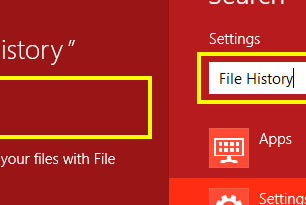
The idea behind it is quite simple. Windows 8 File History takes a snapshot of your files in your libraries every hour ( or a time span you prefer ) and saves them to a drive of your choosing ( preferably an external drive ) for safe keeping. File History resides in Control Panel under System and Security. But for easy navigation under Windows 8, just hit the Windows Key and F. Then type in “file history“.

Select the File History result as shown above outlined in yellow to open it up.

Hit the “turn on” button and choose a folder. I created a folder on my Windows Home server called File History.

Just hit the “run now” button. The first time seed copying of everything in your libraries could take a while depending on how much stuff you have in there.

And there you have it, all of your important files backed up on a regular basis.

After file history has had time to collect some snapshots of your files, you can go to any folder which is backed up by File History and click on the History button.

You are then shown a screen where you can view how your files have changed over time.

Pressing the next/previous button will cycle through your changes.

 
 Share on Facebook Share on Twitter Share on Reddit Share on LinkedIn
Comments Off  comments 
formats

My Even Newer Office

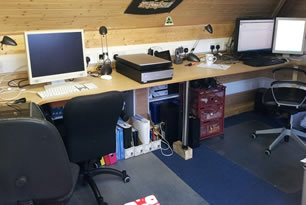
The observant of you will notice that I had a new office built in my garage around 8 months ago. Well as it happens, plans have changed again. We have decided to use that garage space for something else and move my office up into the loft.

To accommodate this change, I had 2 skylights fitted in my loft to give me natural light up there and I had a custom desk made as you can see in the photos. Its a longer desk by about 1 meter than my other office.

I also fitted 6 Ikea kitchen base units in the eaves to give me more space. I had to do this for somewhere to put all the junk before I moved my stuff up there.

Total cost was just under £400 for the Ikea units, £640 for the skylights and £100 for the desk with labour coming in at £200. Total cost was around £1340.

 
 Share on Facebook Share on Twitter Share on Reddit Share on LinkedIn
Comments Off  comments 
F-Drone on Windows Phone 7
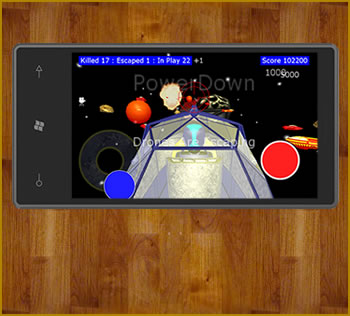
Killing enemy drones has never been so much fun. In F-Drone you play “The man on the rail” - or “Railman” for short. Your job is to kill as many incoming drones as you can before they escape back to their mothership. You are equipped with your reliable laser weapons and your fast reactions. Powerup your lasers by killing drones carrying powerups. Move Railman around the edge of his spacecraft whilst pitching him up and down – then Fire! Featuring: * 3D environment, 12 levels of killing packed fun with hundreds of drones, 5 different types of enemy drone, Online hiscore, Big explosions, In game fast paced music

Buy From Windows Phone Marketplace
robksmith - Having issues with #TFSPreview at the moment. Error is database 'xyzConfiguration' on server 'xyz' is not currently available @TFService 240 days ago
© Zengo Systems Limited